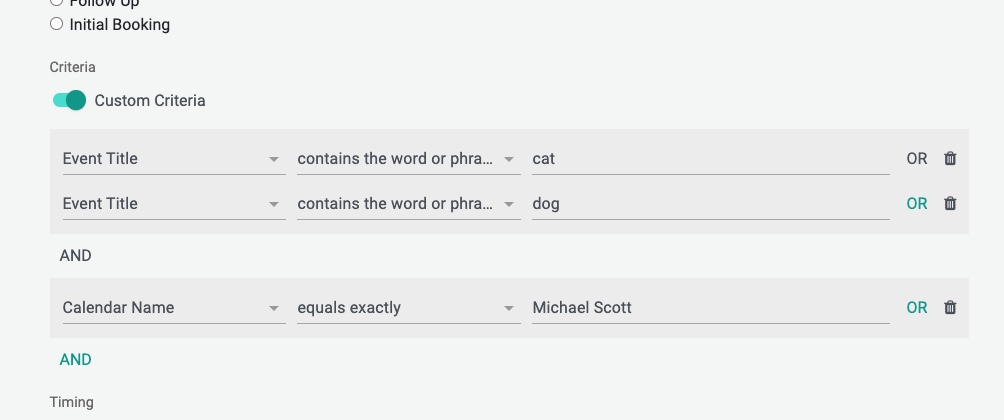
When creating Reminder Templates you have the ability to use fine grained criteria to control when and what notifications you send to your Customers and Clients.
Below you will find an explanation of what some of the criteria “Operators” mean:
| Operator | Meaning | Examples |
| contains the word or phrase | Will match “words” or “phrase”. DO NOT try to match non alpha characters with word/phrase matches | “cat” will match: “cat in the hat” but NOT caterpillar OR catherine #spanish will NOT match “#spanish with Jose” |
| contains the text | Will partial match “words” or text. Note: If you are using non alpha characters such as hashtag or brackets, you will want to use THIS operator | “cat” will match “cat in the hat”, caterpillar, catherine #spanish will match “#spanish Meeting with Jose” |
| does not contain the word or phrase | Does NOT contain the “words” or “phrases” | |
| does not contain the text | Does not partial match words or text | |
| equals exactly | Matches Exactly | “cat” will match “cat” only, no other text |
| does not equal | Does NOT match Exactly |
See Criteria or Criteria Operators that you need and we don’t have? Please let us know, email to [email protected]
Other questions? Email to [email protected]
Happy Scheduling!
FAQs
What does the 'contains the word or phrase' operator mean in Reminder Templates?
The 'contains the word or phrase' operator matches exact words or phrases. For example, 'cat' will match 'cat in the hat' but NOT 'caterpillar' or 'catherine'. It does not work well with non-alphanumeric characters.
How is the 'contains the text' operator different from 'contains the word or phrase'?
The 'contains the text' operator performs a partial match on words or text and works better with non-alphanumeric characters like hashtags or brackets. For example, 'cat' will match 'cat in the hat', 'caterpillar', and 'catherine', and '#spanish' will match '#spanish Meeting with Jose'.
What should I do if I need a Criteria Operator that is not available?
If you need a Criteria or Criteria Operator that is not currently available, you can email your request to [email protected].