
When you use GReminders to schedule your meetings, you can require approval prior to the initial bookings. This is a great way to filter the events that are being booked on your calendar and only approve what is necessary. You can learn more about Requiring Approval prior to the initial bookings by Clicking Here.
But what if your Client wants to Reschedule?
Whether you use the Require Approval feature for your initial booking or not, you can require approval if a client wants to reschedule an appointment. This works very similar to approval for an initial booking and is a great way to ensure you are aware of any rescheduled appointments.
How it Works:
While creating or editing an Event Types in GReminders you will see an option for ‘Require Approval if Client Reschedules’.
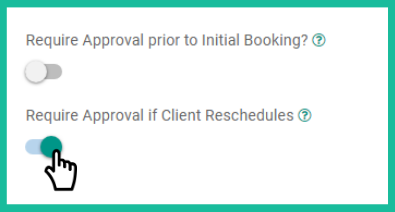
By selecting this option, you will receive an email when a customer attempts to reschedule an event. You will have the option to either Approve or Deny the rescheduling. You can see an example of this email below:
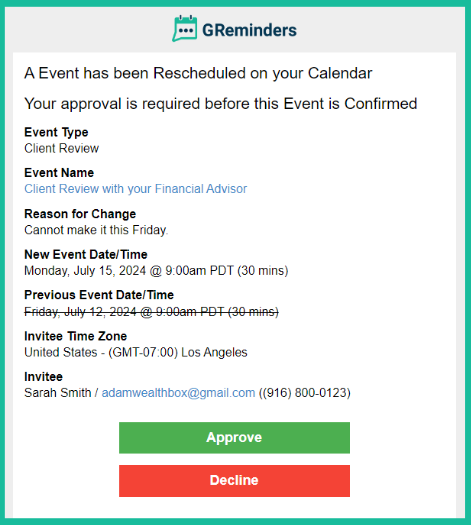
Your clients will also have received this message when they attempted to reschedule, notifying them that this meeting is tentative and is waiting on your approval.

Please Note: During this time both timeslots are taken on your calendar to preserve the time (the original meeting time as well as the newly requested time). This will not change until you either approve or deny the rescheduling request.
If you Approve the Rescheduling:
If you Approve the request, the original appointment on your calendar will be removed and the new date will be left on your calendar. If you have a Reschedule Reminder enabled, your clients can also receive a notification that this appointment has been rescheduled. Please Click Here to learn more about Reschedule Reminders.
If you Deny the Rescheduling:
If you Deny the request, the original appointment will remain on your calendar. Since the original appointment was not changed, no reminder is sent to your client. Please contact them as needed to discuss the scheduling.
Few other Notables:
- Payments are currently not supported for Event Types that require Approval (if you need this please contact [email protected])
- Events will auto decline after 14 days if you do not approve them. You can change this setting under Host Settings.
- Approvals do not work for Group Events (it doesn’t make much sense)
- Remember, notifications will NOT go out UNTIL you Approve the Event/Meeting.
That’s It! Stay in control of your calendar, require approval when clients reschedule.
If you have questions, contact us here.
Happy Approving and Rescheduling!
FAQs
Can I require approval when a client wants to reschedule an appointment?
Yes, you can enable the 'Require Approval if Client Reschedules' option while creating or editing Event Types in GReminders. This way, you will receive an email notification when a client attempts to reschedule, and you can approve or deny the request.
What happens if I approve or deny a rescheduling request?
If you approve the rescheduling, the original appointment is removed from your calendar and replaced with the new date. If you deny the request, the original appointment remains on your calendar and no reminder is sent to the client.
Are there any limitations or important notes about the approval feature?
Yes, payments are not supported for Event Types that require approval, approvals do not work for Group Events, events auto-decline after 14 days if not approved (this setting can be changed), and notifications to clients are only sent after you approve the event or meeting.