
Integration with SS&C’s Black Diamond brings unified financial intelligence directly into GReminders. By bridging Black Diamond’s wealth management engine with GReminders’ automation workflows, advisors can spend less time hunting down portfolio details and more time delivering high-impact client interactions.
What the Integration Delivers
Black Diamond acts as a centralized source of truth, pulling complex financial data across multiple platforms and clearing firms. Connecting it to GReminders automatically streams critical client insights right where you prepare for meetings:
- Relationship Data: Clear visibility into household structures, family links, and key client contact profiles.
- Account & Portfolio Breakdown: Instant access to account types, total assets under management (AUM), holdings, and asset allocation across connected institutions.
- Performance Insights: Up-to-date account performance metrics and reporting data ready at a glance.
How It Powers Your Workflow
1. Pre-Meeting Prep
No more manual data gathering before client sit-downs. GReminders automatically synthesizes Black Diamond’s portfolio and relationship data into concise, automated pre-meeting briefs. When an upcoming meeting appears on your calendar, your brief is already generated with the latest account balances, household overview, and performance updates.
2. Ask Anything (AI Assistant)
Need quick answers about a client before jumping on a call? Query the GReminders Ask Anything feature to pull instant insights directly from Black Diamond data.
Simply ask plain-language questions like:
“What is the combined portfolio value for the Smith household?”
“What is their Asset Allocation?”
“What is the expected annualized income for this year?”
How to Set it Up
To integrate Black Diamond to GReminders you need to get your some API Keys from Black Diamond.
Open a new Support Ticket through Case Management inside your Black Diamond account, or send it directly to your dedicated Black Diamond service contact.
You can also go to request this by filling out the API Questionnaire here.
If Black Diamond asks for a callback URL it is https://app.greminders.com/blackdiamond-oauth
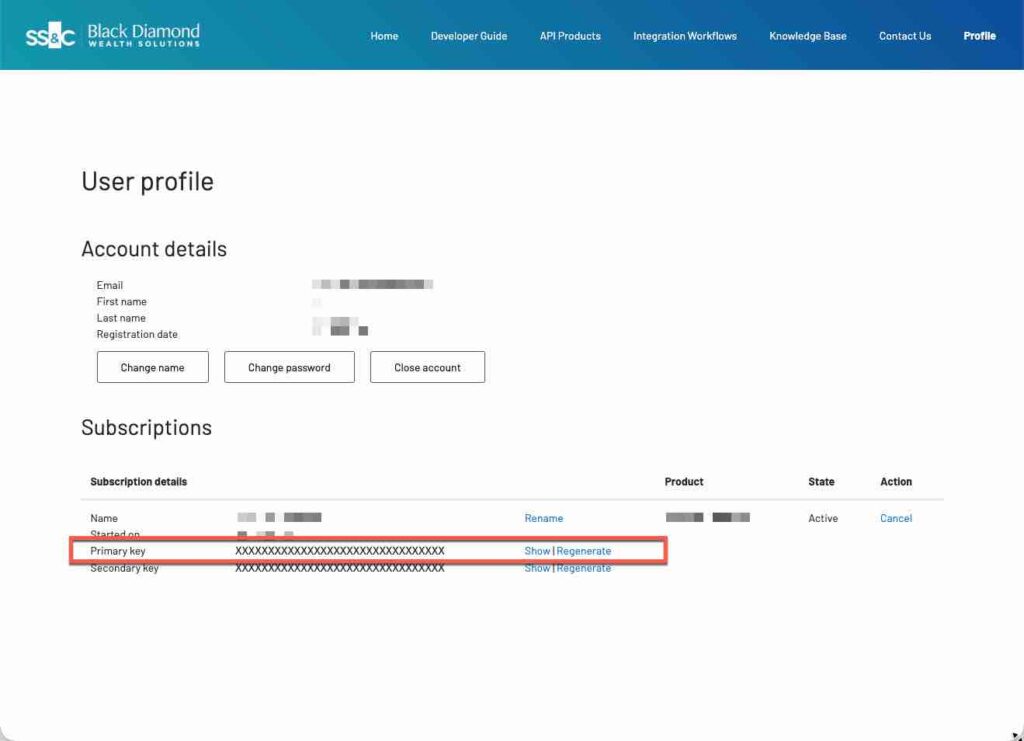
Once you receive the Client ID and Client Secret from Black Diamond go to the Black Diamond Developer Portal and get your Subscription Key.
Now, in GReminders as an Administrator go to Setup > Integrations and search for Black Diamond.
Click Connect then Setup.
Enter all 3 pieces of information you collected above. The Client ID, Secret and Subscription Key.
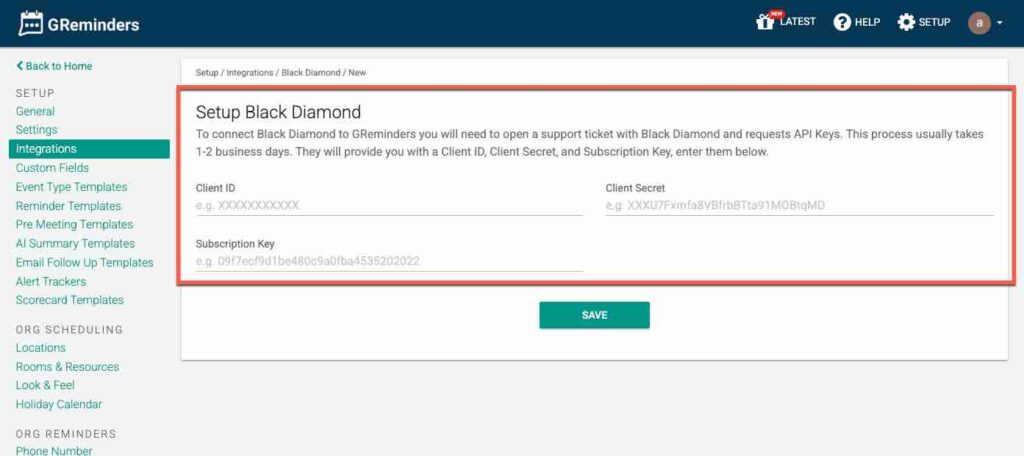
Click Save
This should take you to a Black Diamond login screen where you enter your standard Black Diamond Credentials.
This should successfully bring you back to the GReminders Setup Page.
That’s It. You are now connected.
To confirm its working navigate to your CRM Contacts in GReminders. Ask a question like “Show me all the information in Black Diamond on this client”
The system should return everything it sees.
Additionally you can add Pre Meeting Brief Instructions in the template.
Looking for additional functionality? Contact [email protected]
FAQs
What does the integration with Black Diamond provide?
The integration provides centralized access to financial data, including relationship data, account and portfolio breakdowns, and performance insights, streamlining pre-meeting preparations for advisors.
How can I quickly get client insights using GReminders?
You can use the 'Ask Anything' feature in GReminders to query Black Diamond data for instant insights by asking plain-language questions about client portfolios and accounts.
How do I set up the integration between Black Diamond and GReminders?
To set up the integration, obtain API keys from Black Diamond, enter them in GReminders under Setup > Integrations, and follow the prompts to connect your accounts.