Overview – Why It Matters
In the financial advisory space, most tools focus strictly on “money in motion” (e.g., job changes, inheritance, divorce). While that data is useful, it misses a massive, real-time opportunity: “people in motion.” These are prospects actively researching an advisor or firm across the web but dropping off before finalizing an action.
According to web analytics, an average of 30% to 40% of standard website traffic can be actively identified at the individual contact level (excluding those using cloaked VPNs or rejecting cookie banners). That means if a firm gets 1,000 visitors a month, 300 to 400 people are checking them out but leaving without booking a meeting.
Closing the “Drop-Off” Gap
The integration between WealthReach and GReminders bridges the gap between active interest and an empty calendar.
- Capturing Intent: When a prospect clicks an advisor’s GReminders booking link (on a website, email signature, or social profile) but exits right before completing the booking, they normally vanish.
- Actionable Identity: This integration surfaces exactly who that person was—providing their name, verified personal/work emails, phone numbers, wealth/income ranges, and LinkedIn profiles.
- The “Tap on the Shoulder”: Instead of letting a warm lead go cold, advisors get the exact insight needed to deliver a gentle nudge or a personalized invitation to finish booking their meeting.
Watch an Overview Video
How to Enable the Integration
Enabling the connection between the two platforms requires virtually zero technical expertise. Advisors do not need to navigate complex analytics systems.
Step-by-Step Setup:
1. Log into your WealthReach dashboard and locate your Wealthreach Account ID.
2. in GReminders go to Setup > Integrations > Wealthreach and Paste the Wealthreach Acccount ID.
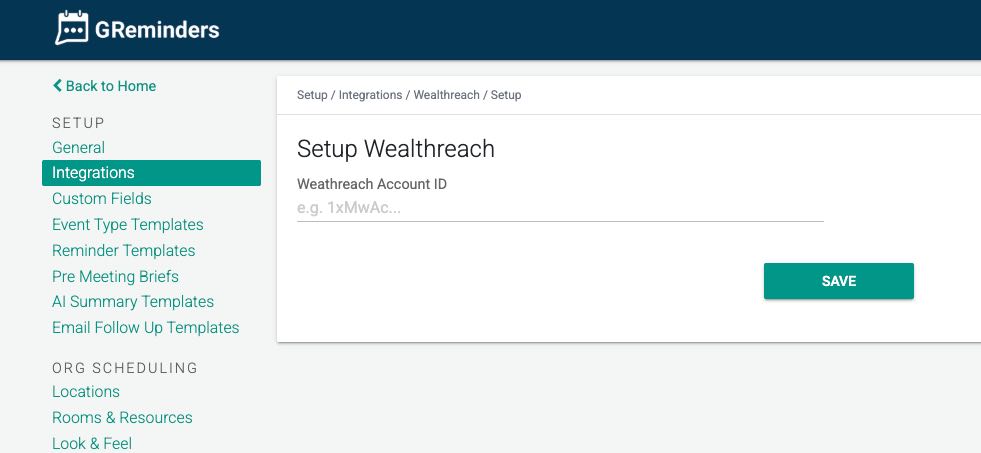
Once the Account ID is saved, any meetings booked (via GReminders Booking Pages) will automatically flow back into Wealthreach meaning that you will now be able to get actual Attribution.
That’s It
Any questions? Email to [email protected]
FAQs
What problem does the WealthReach and GReminders integration solve?
The integration helps close the 'drop-off' gap by identifying prospects who show active interest by clicking a booking link but leave before completing the meeting booking. It provides advisors with detailed contact information and insights to follow up and convert these warm leads.
How do I enable the integration between WealthReach and GReminders?
To enable the integration, log into your WealthReach dashboard to find your Account ID. Then, in GReminders, go to Setup > Integrations > WealthReach and paste the Account ID. Once saved, meetings booked via GReminders will automatically sync back into WealthReach for attribution.
Do I need technical expertise to set up the WealthReach and GReminders integration?
No, enabling the connection between the two platforms requires virtually zero technical expertise and does not involve navigating complex analytics systems.