GReminders has different licenses for different use cases.
When you purchase Scheduling or Notetaker Unlimited License(s) you will decide who those licenses should be assigned to.
To apply these Licenses you need to be an Administrator.
Go to Setup > Users
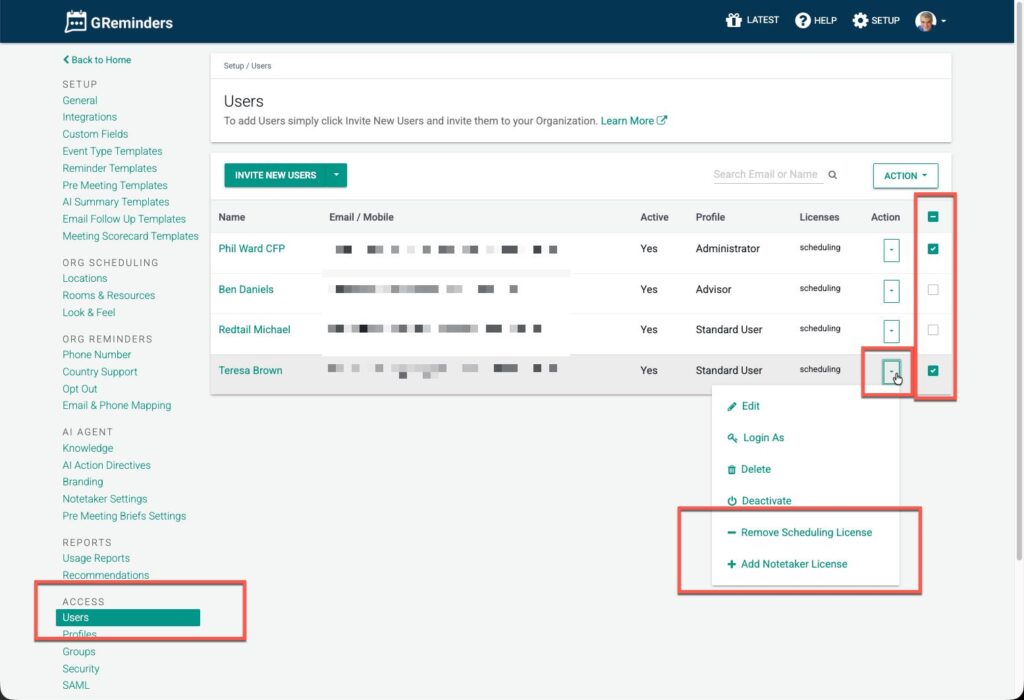
From here you can apply licenses at the user level, or use the checkboxes on the right and bulk apply licenses. You can also click into the user and adjust their licenses there.
For New Users you invite, you will see an option to automatically apply licenses when you invite them.
Note: if no licenses are applied, you will be able to login to the System and access Setup and other features, such as access other people’s Notetaker (so long as they shared notetaker records with you), or access Teams, Routing Forms, Bulk Sends. This is common for Admins who do not need to host AI Notetaker Meetings OR host meetings via Event Types.
Any Questions? Email to [email protected]
FAQs
How do I apply licenses to users in GReminders?
To apply licenses, you need to be an Administrator. Go to Setup > Users, then apply licenses at the user level or use the checkboxes on the right to bulk apply licenses. You can also click into a user to adjust their licenses.
Can I automatically apply licenses to new users I invite?
Yes, when you invite new users, you will see an option to automatically apply licenses to them.
What happens if no licenses are applied to a user?
Users without licenses can still log in to the system and access Setup and other features like other people's Notetaker records (if shared), Teams, Routing Forms, and Bulk Sends. This is common for Admins who do not need to host AI Notetaker Meetings or meetings via Event Types.