When notetaker is taking all your notes across your phone, virtual meetings, in person, etc… a lot of content comes together. Many calls may not rise to the level of action, some do and some don’t. So how do we get the signal from the noise?
Introducing Focused View on Notetaker.
Please note: this feature is in beta as of November 2025.
Focused view is a tab that you can enable on Notetaker which brings all client meetings GReminders believes are the most important to you that should be acted upon.
Here is the criteria for meetings to show up in the Focused View:
- You are the owner or the meeting has been shared to you
- AI has identified it as a client engagement (vs internal or vendor call)
- More than 10 minutes in length
- Happened in the last 30 days
- Has NOT been written back to the CRM yet

If you want to ignore a meeting, simply click on the right “eye” icon and it will be dismissed.
You can always get to ALL of your notetaker summaries and meeting by clicking on the ALL tab. This dismissal will only dismiss it from the Focused Tab.
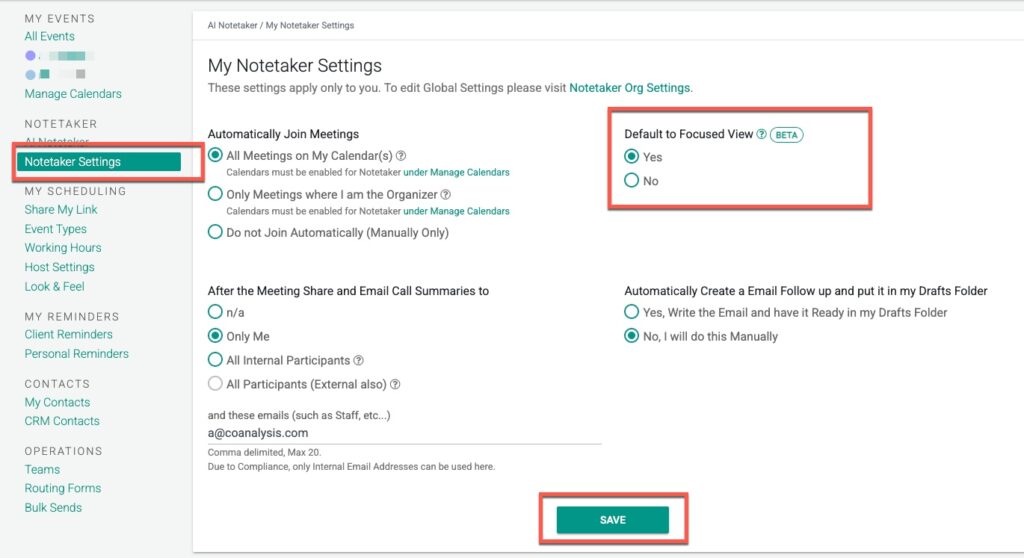
To enable focused view go to Notetaker Settings and enable it
That’s It.
If you disagree with the AI classification or have questions, please contact [email protected]
FAQs
What is Focused View on Notetaker?
Focused View is a feature in Notetaker that highlights client meetings identified as most important and actionable, helping users get the signal from the noise in their notes.
What criteria does a meeting need to meet to appear in Focused View?
Meetings must be owned by or shared with you, identified by AI as client engagements, longer than 10 minutes, occurred in the last 30 days, and not yet written back to the CRM.
How can I enable or dismiss meetings in Focused View?
You can enable Focused View in Notetaker Settings. To dismiss a meeting from the Focused Tab, click the eye icon on the right; dismissed meetings remain accessible under the ALL tab.