If you are using AI Notetaker (you should, it will save you LOAD of time) and after the meeting the Summaries and Action Items are generated, we will recommend Workflows to be triggered by you.
IF you are using a CRM with Workflows OR other Workflow Tools such as PreciseFP, etc… AI Notetaker will recommend which Workflows should be triggered after a Meeting.
Lets take this example which was a Follow up Call to a Prospect Meeting. On the call the customer agreed to move forward with an engagement and transfer some funds from one Custodian to another.
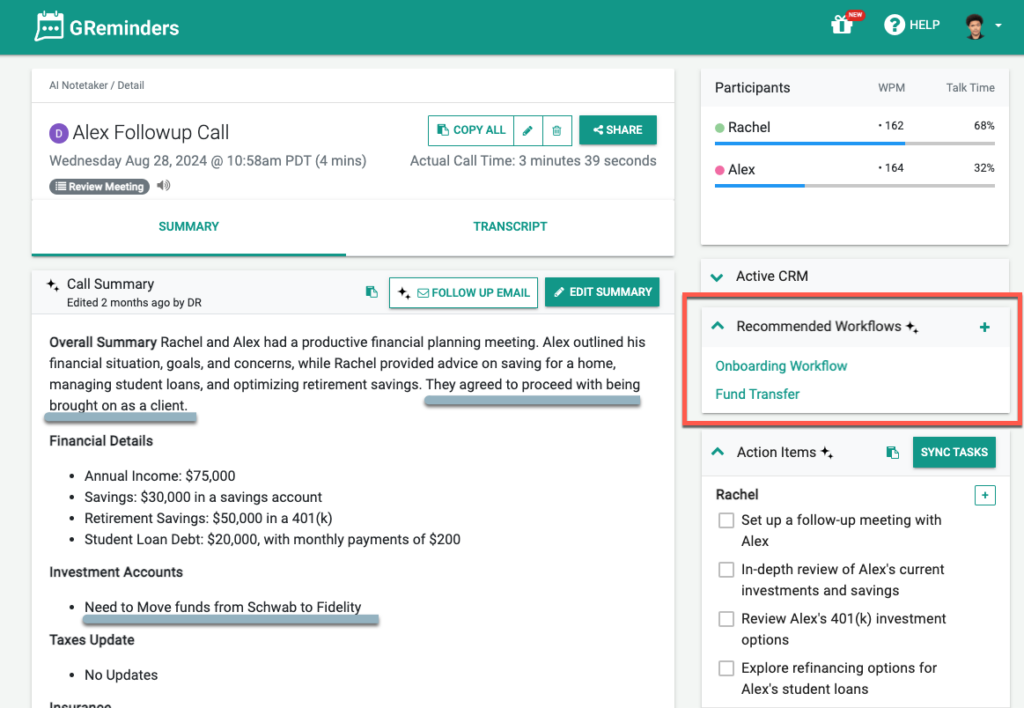
You can see we have recommended some Workflows to be fired off.
YOU need to trigger them, but that is simply done with a simple click of the mouse. If you think they were not relevant, ignore them by clicking the little X next to them or just leave them there.
If you do want to trigger them, click on it, select the proper Contact, set a Target Due Date and Launch them with the click of a button.
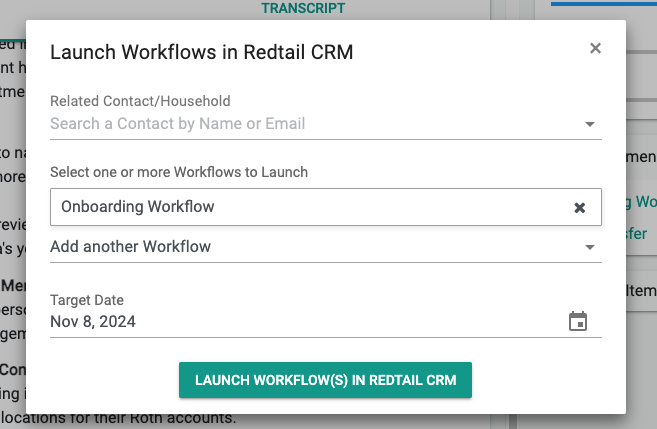
In this way, we were connected to Redtail and kicked off a Workflow in Redtail. This works just as well in Wealthbox, PreciseFP, Hubspot and other CRMs that GReminders supports Workflow on.
Yet another way to save time with AI & Automations. We would love your feedback.
Happy Operations.
Any questions? Email to [email protected]
FAQs
How does AI Notetaker recommend workflows after a meeting?
After a meeting, AI Notetaker generates summaries and action items, then recommends relevant workflows to be triggered based on the meeting content and your connected CRM or workflow tools.
How do I trigger the recommended workflows in AI Notetaker?
You can trigger recommended workflows with a simple click. Select the workflow, choose the proper contact, set a target due date, and launch it by clicking a button. If the workflow is not relevant, you can ignore it by clicking the little X next to it.
Which CRM and workflow tools are supported for triggering workflows through AI Notetaker?
AI Notetaker supports triggering workflows in CRMs and workflow tools such as Redtail, Wealthbox, PreciseFP, Hubspot, and others that GReminders supports for workflows.