Each user on the account is assigned a profile. Administrator and standard users are the default profiles.
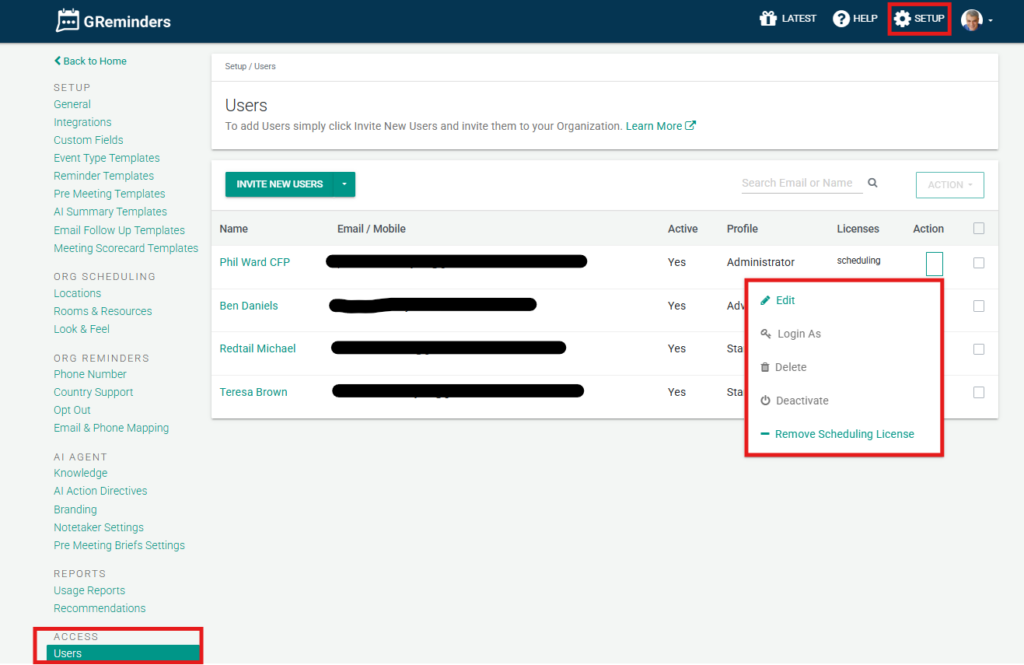
To invite a new user, go to Setup > Users and click Invite New Users.
Enter the email addresses of the users you want to invite.
If you prefer you can also import users via CSV Import for bulk user import.
Indicate the profile you would like the user to inherit during sign-up. Profiles control Permissions. Read more about Profiles.
Administrators will have advanced controls over users. By simply clicking the drop down arrow on that users row you can:
- Edit the user’s profile.
- Apply scheduling and notetaker licenses
- Deactivate a user so they don’t count against your user number, but you retain their data for reports.
- Completely delete the user.
- Send a password reset notification.
- Log in as the user.
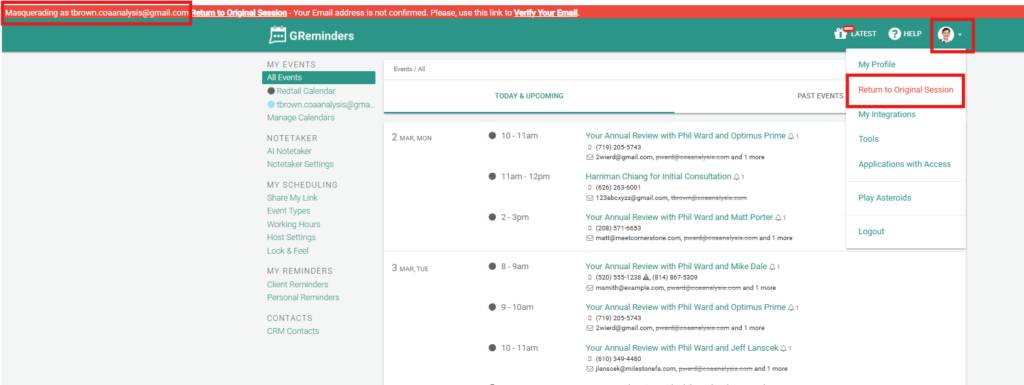
If you “login as” the user, at the top of the screen you’ll see you are masquerading as the user. You can view the user’s upcoming events and scheduled reminders, see the managed templates available to the user, and any templates the user has created themselves if allowed by the administrator.
You can also see managed and user-created event types. Click on Return to Original Session to return to the admin account.
If you have additional questions please contact [email protected].
FAQs
How do I invite a new user to the account?
To invite a new user, go to Setup > Users and click Invite New Users. Enter the email addresses of the users you want to invite. You can also import users in bulk via CSV Import.
What controls do administrators have over users?
Administrators can edit the user's profile, apply scheduling and notetaker licenses, deactivate or completely delete a user, send a password reset notification, and log in as the user.
What happens when an administrator logs in as a user?
When logged in as a user, the administrator can view the user's upcoming events, scheduled reminders, managed templates, and user-created templates if allowed. The administrator can return to their original session by clicking 'Return to Original Session'.