GReminders allows you to ask Custom Questions when clients or prospects schedule appointments through your Event Types. This powerful feature enables you to gather important details directly at the time of booking, while integrating seamlessly with your reminders and calendar events.
One common use case is capturing potential changes to client information, such as a new address, without automatically overwriting existing data in your CRM.
Asking About a Change of Address
Along with asking for the address, you can set up custom questions to ask something like: “Check the box if this is a NEW address” (Checkbox selection).
To set this up, go to ‘Setup’ > ‘Custom Fields’ > ‘New Custom Field’ for Events.

How it looks on a scheduling page:

When a client selects the checkbox and provides the new address during scheduling:
– The answers are automatically recorded in the scheduled calendar event’s description.
– You can include these answers in personal reminders using insertable fields.
– Most importantly, the information is logged for your reference but does not automatically update or overwrite the client’s existing address in your connected CRM (e.g., Redtail, Wealthbox, Salesforce, HubSpot, etc.).
This ensures data integrity in your CRM while still capturing timely updates.
Triggering a Personal Reminder for Yourself
To stay on top of these changes, use the GReminders Personal Reminders feature with criteria based on the custom question answers.
For instance:
1. Create a Personal Reminder template (sent via SMS, email, or voice call to yourself or a team member).
2. Add Custom Criteria such as: ‘Change of address‘ > ‘is‘ > ‘True‘.
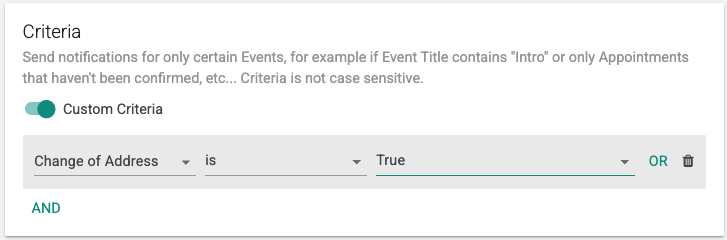
– Optionally, include the new address field in the reminder message for quick reference.

3. Schedule the personal reminder to send at a convenient time (e.g., 1 day before the meeting or immediately after booking).
This notifies you promptly, allowing you to manually review and update the client’s CRM record as needed—ensuring compliance and accuracy without risking unintended overwrites.
Key Benefits
– Timely Capture: Clients provide updates at the moment they’re most relevant (during scheduling), reducing forgetfulness.
– Logged Securely: All responses are saved in the event details for audit trails and easy access.
– No Automatic Overwrites: Protects your CRM master data from unverified or erroneous updates.
– Proactive Notification: Personal reminders alert you to act, streamlining your workflow and improving client service.
– Customization: Use fields to personalize reminders, and combine with other criteria (e.g., event type or category) for even more precision.
To set this up:
1. Go to ‘Setup‘ > ‘Custom Fields‘ to create your questions. (example above)
2. Add them to your relevant Event Type Template(s).
3. Create a Personal Reminder, utilizing the Custom Question. (example above)
With GReminders Custom Questions, you can easily collect updates like a new address when someone books an appointment and be notified—without automatically overwriting your existing CRM data.
That’s it! Any questions? Please email [email protected]
Happy Scheduling!