Usage reports can be accessed by Global Administrators of your GReminders account.
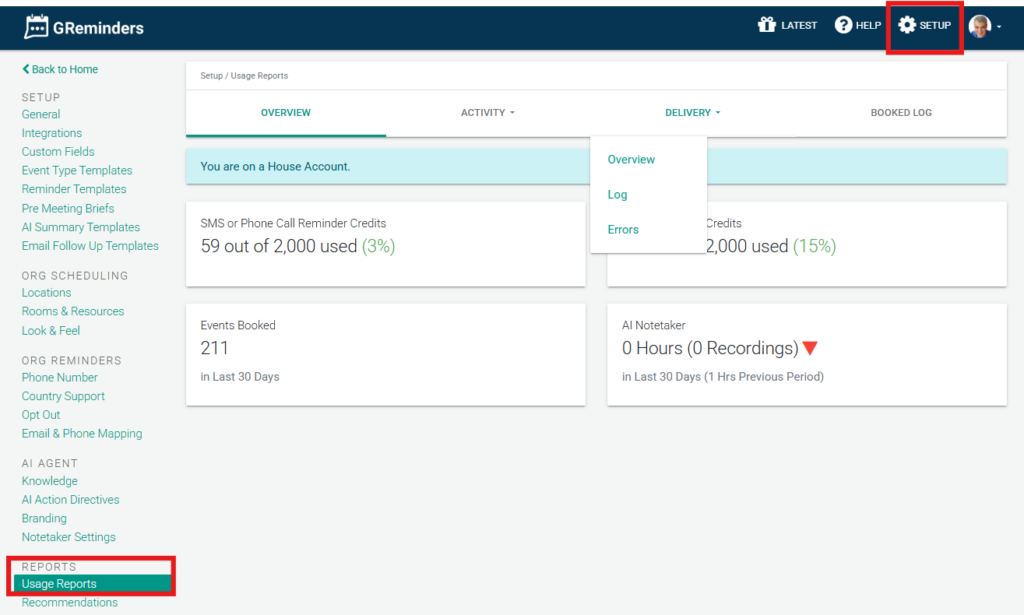
To access these go to Setup > Usage Reports.
Usage Reports allow you to track your usage of the program and see detailed information that helps you understand more about your business.
Reports can be broken down by users. Here, you can also access a log of all reminders and replies sent and received on our system. The archive can be downloaded to a CSV file with more detailed information.
Additionally, you can see meeting that have been booked and cancelled under the booked log section.
FAQs
Who can access usage reports in GReminders?
Usage reports can be accessed by Global Administrators of your GReminders account.
Where can I find the usage reports in GReminders?
You can access usage reports by going to Setup > Usage Reports in your GReminders account.
What information is available in the usage reports?
Usage reports provide detailed information including usage tracking, logs of all reminders and replies sent and received, and records of meetings that have been booked and cancelled. The logs can also be downloaded as a CSV file.