If you use Ring Central as your phone system, you can now get all the benefits of AI Notetaker with Ring Central Calls.
Benefits include:
- Automatic Summaries of the Call
- Extracting Tasks/Action Items from the Call
- One click push into your CRM or System of Record
Read More about the Benefits of AI Notetaker here.
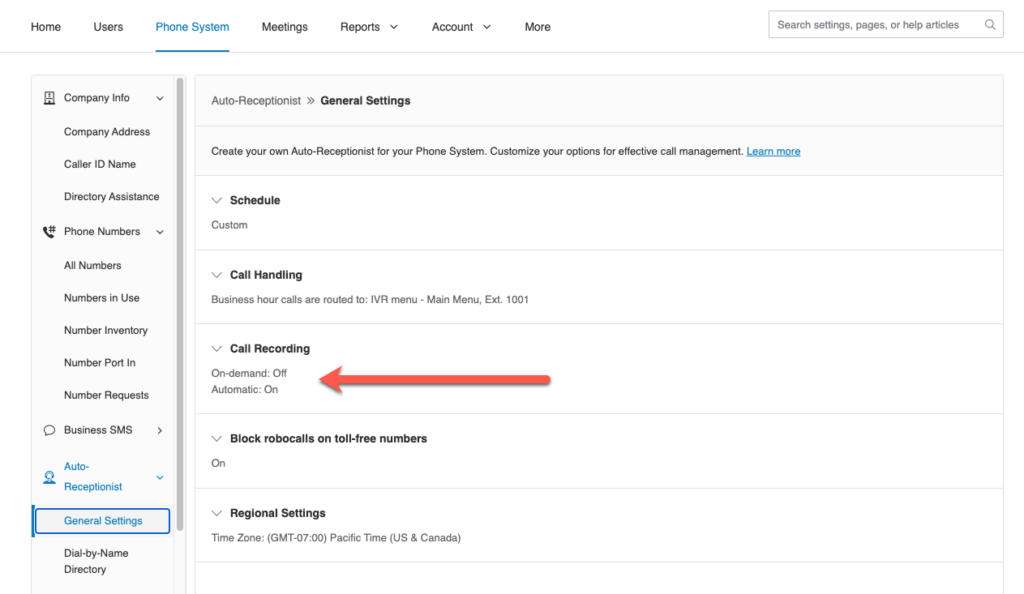
In order for GReminders to get the recording, you need to enable Recordings on Ring Central. You can do this via the Admin Console OR you can do this on demand when you are on your call (via your Ring Central Soft Phone).
We would recommend setting Call Recording to auto:
Next, each GReminders USER needs to connect their Ring Central Extension to GReminders. In GReminders, go to your Profile > My Connections and click ADD Next to Ring Central:

Assuming you have set your Extension to auto-record, all inbound and outbound calls will be processed through the AI Notetaker.
Super Simple!
That’s It.
Any questions? Email to [email protected]
Happy Meetings!
FAQs
What are the benefits of using AI Notetaker with Ring Central Calls?
The benefits include automatic summaries of the call, extracting tasks and action items from the call, and one-click push of this information into your CRM or system of record.
How do I enable call recordings on Ring Central for AI Notetaker to work?
You need to enable recordings on Ring Central either via the Admin Console or on demand during your call using the Ring Central Soft Phone. It is recommended to set call recording to auto.
How do I connect my Ring Central extension to GReminders?
In GReminders, go to your Profile, then My Connections, and click ADD next to Ring Central to connect your extension.