To connect to your Intermedia/Osaic Calendar do the following:
Go to GReminders Manage Calendars and click Connect Another Calendar
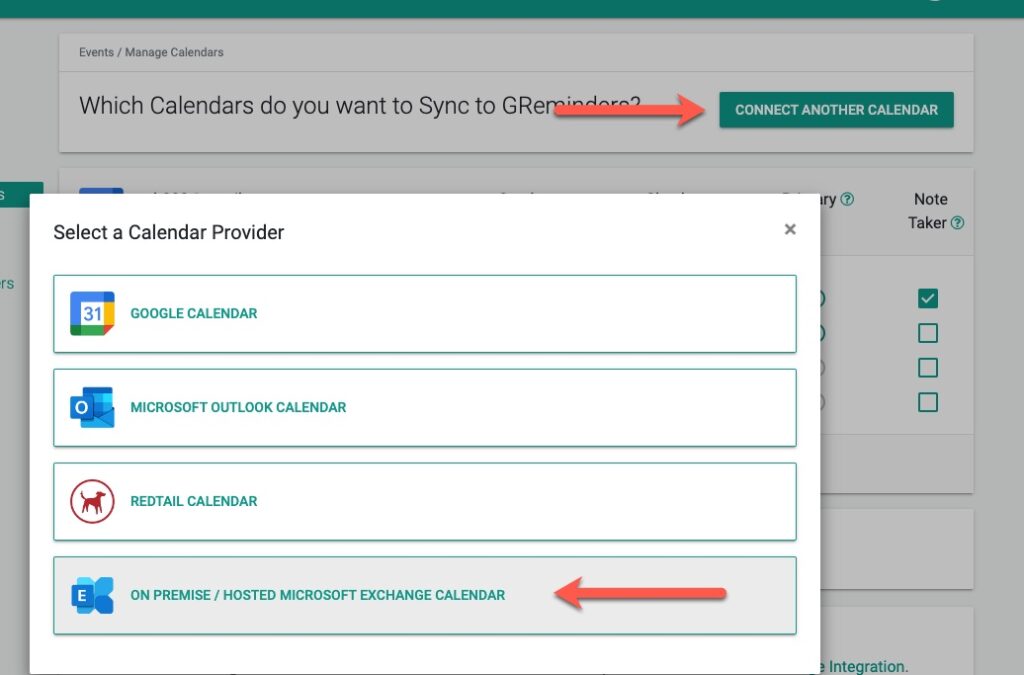
Next Enter your Email address and Email Password. For the Exchange Web Services URL use:https://agmail.smarshmail.com/
ORhttps://mail.smarshmail.com/
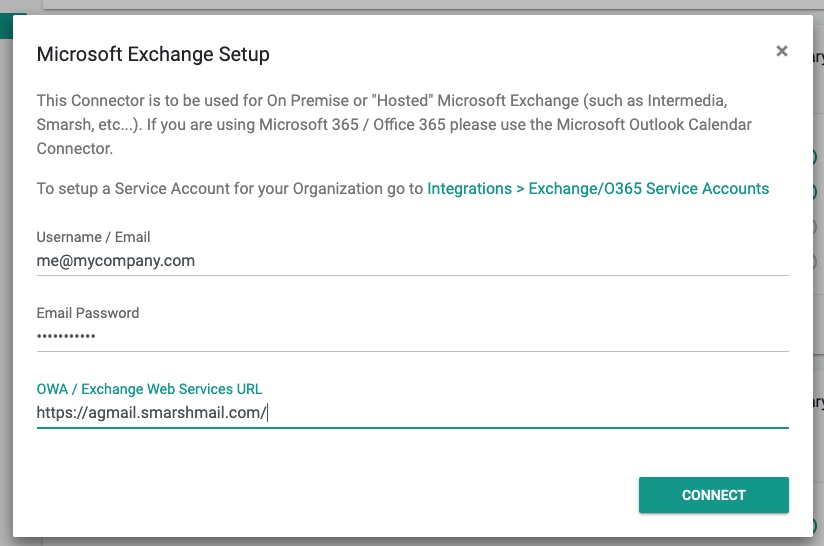
That should be it. If you have problems please read on.
Troubleshooting
Please make sure your password is actually correct. This is your Email Password, likely different then what you use to logon to your computer.
Confirm this by going to:
https://agmail-2fa.smarshmail.com OR https://agmail.smarshmail.com
and logging in with the same password you entered above.
Other things to Mention:
- Intermedia is the actual host of your Email/Calendar
- Your Email/Calendar is being hosted on Microsoft Exchange “Hosted” (You are not on Microsoft Office 365 of Microsoft 365/Cloud)
If you have issues connecting please send an email to open a ticket with [email protected].
Alternative Solution (for Redtail Customers)
IF you are a Redtail Customer AND you use Outlook Desktop you can use Redtail’s Tailwag product which syncs your Outlook Desktop’s Calendar to Redtail Calendar. From here you can connect Redtail Calendar to GReminders.
- Download Tailwag (Windows Only)
- Install Tailwag (use this configuration below)
- Sync Calendar
- Skip Contacts
- Set sync to every 1 hour (you can set it to shorter to speed up sync times)
- This should sync your Outlook Events to Redtail Calendar (it may take 15-30 minutes on initial sync)
- Go back to GReminders and go to Manage Calendars
- Connect your Redtail Calendar
- After 30 minutes you should see your Outlook Events in GReminders
This method works by syncing your local Outlook Calendar to Redtail. This sync only works when your computer is on and Outlook Desktop is on.
If you have continued issues please contact [email protected]
FAQs
How do I connect my Intermedia/Osaic Calendar to GReminders?
Go to GReminders Manage Calendars and click Connect Another Calendar. Enter your Email address and Email Password. Use the Exchange Web Services URL: https://agmail.smarshmail.com/. That should complete the connection.
What should I do if I have trouble connecting my Intermedia/Osaic Calendar?
Make sure your email password is correct (it may differ from your computer login password). Confirm by logging in at https://agmail-2fa.smarshmail.com or https://agmail.smarshmail.com with the same password. If issues persist, contact [email protected] to open a support ticket.
Is there an alternative way to sync my calendar if I am a Redtail customer using Outlook Desktop?
Yes. You can use Redtail's Tailwag product to sync your Outlook Desktop Calendar to Redtail Calendar, then connect Redtail Calendar to GReminders. Download and install Tailwag (Windows only), configure it to sync calendar every hour, then connect your Redtail Calendar in GReminders. Note that this sync works only when your computer and Outlook Desktop are on.