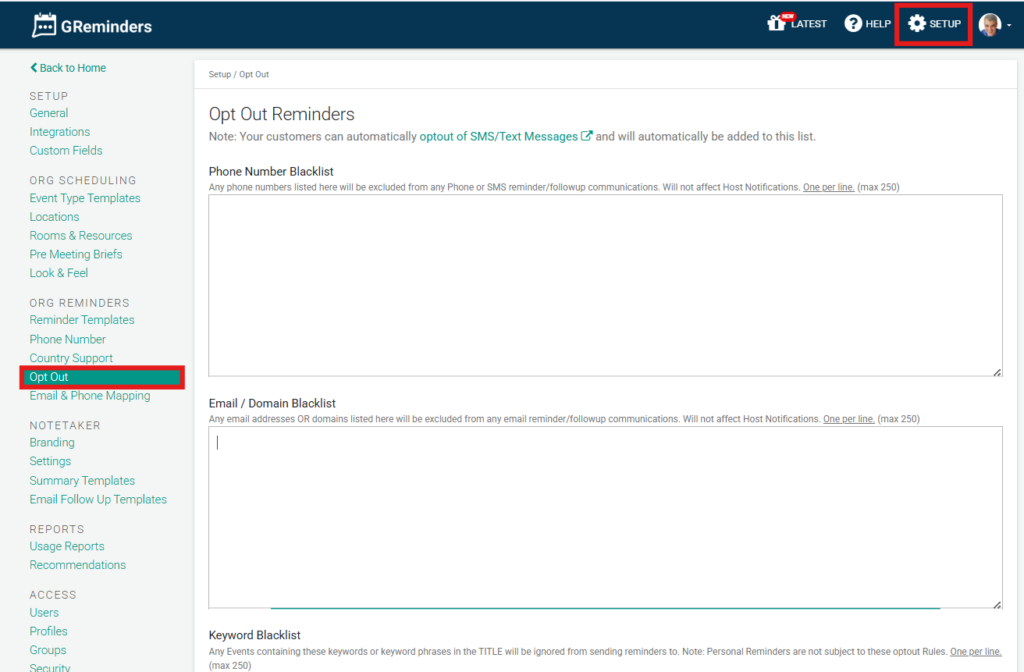
Create your own opt-out phone or email blacklist, or create specific keywords to blacklist certain events from receiving reminders.
Email and Domain Blacklist
When an email address or an entire domain is added to this list:
- Exclusion from Reminders: The recipient will be automatically excluded from all email reminders and follow-up communications.
- Host Notifications: This setting does not affect Host Notifications; the internal organizers will still receive their necessary alerts.
SMS and Phone Blacklist
For SMS communications, the platform adheres to standard Support for SMS Opt-Out Keywords (such as STOP, CANCEL, or UNSUBSCRIBE). Once a number is blacklisted:
- Automated Blocking: The system will cease sending text reminders to that specific phone number to ensure TCPA & SMS compliance.
Keyword Blacklisting
You can use Keywords to prevent reminders from trigger for specific events on your calendar.
- Any event containing a specific blacklisted keyword or phrase in its title will be ignored by the reminder system.
Opt Out Scheduling
You can block certain clients or customers from booking with you by adding their email or domain to this Optout Scheduling List. There is a setting on the Event Type to respect this list or not. Meaning some Event Types can block these people from booking with you or your Users and other Event Types can allow it.
FAQs
What happens when an email address or domain is added to the Email and Domain Blacklist?
The recipient will be automatically excluded from all email reminders and follow-up communications, but Host Notifications to internal organizers will still be sent.
How does the SMS and Phone Blacklist work?
When a phone number is blacklisted, the system stops sending text reminders to that number to ensure compliance with TCPA and SMS regulations. The platform also supports standard SMS opt-out keywords like STOP, CANCEL, or UNSUBSCRIBE.
What is the purpose of Keyword Blacklisting in the reminder system?
Keyword Blacklisting allows you to prevent reminders from being triggered for specific events by ignoring any event that contains a blacklisted keyword or phrase in its title.