The Keyword Solution
You can use keywords and events on your calendar to trigger specific reminders to groups of individuals.
Keywords allow you to map specific phone numbers or emails to a simple word. If GReminders sees that word in your Event Title, it automatically fires off a notification to the person mapped to it.
The Benefit: You don’t have to change how you book appointments. Just keep typing titles like you always do, and the system handles the routing in the background.
How it works: It uses “contains” logic. If your keyword is “Staff,” then titles like “Staff Meeting” or “Onboarding Staff” will both trigger the alert.
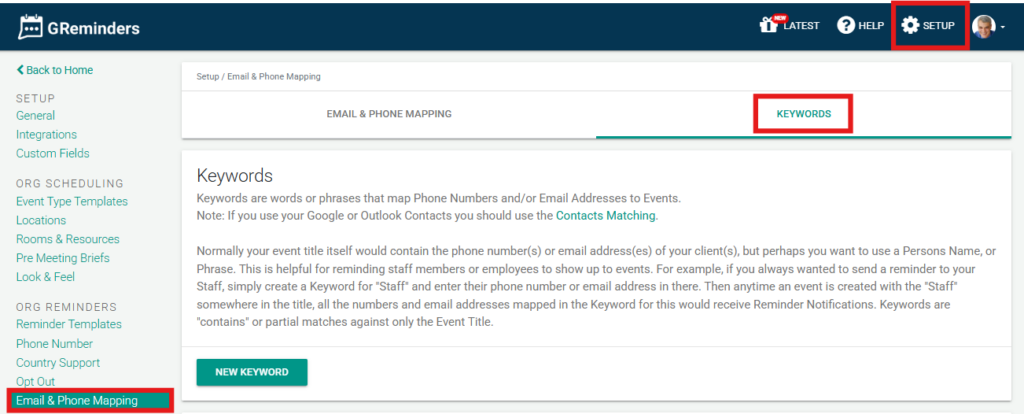
Administrators can locate Keywords by clicking Setup > Email & Phone Mapping > Keywords.
FAQs
What are keywords in GReminders and how do they work?
Keywords in GReminders allow you to map specific phone numbers or emails to a simple word. When GReminders detects that word in your Event Title, it automatically sends a notification to the person mapped to that keyword using 'contains' logic.
How do keywords benefit the appointment booking process?
Keywords let you keep typing event titles as usual without changing how you book appointments. The system automatically routes notifications in the background based on the keywords found in the event titles.
Where can administrators find and manage keywords in GReminders?
Administrators can locate and manage Keywords by navigating to Setup > Email & Phone Mapping > Keywords within the GReminders platform.