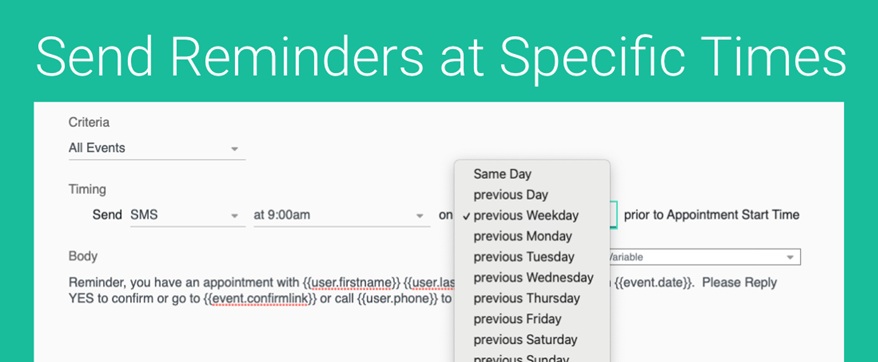
Want to send your SMS, Text, Email or Phone reminders always at 8am for the next day’s appointments?
Send your reminders only on weekdays, so that your appointments on Monday don’t send on Sunday.
Want to send all your Reminders for that week on Monday Morning?
Or send all your Reminders for the next day at the end of the previous day?
We can show you how to set this up!
Go to your Client Reminders or Reminder Templates (Setup > Reminder Templates) and simply select the time you want to send and the relative date.
Here is an example:
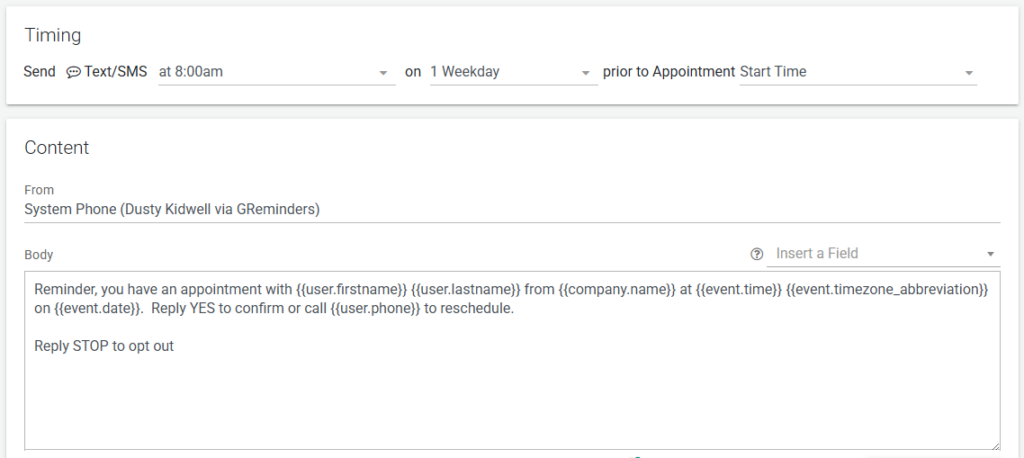
Select the specific time and then the relative date.
In this case your Reminders will be send the previous Weekday at 8am. Reminders for Tuesday appointments will be sent Monday at 8am (your time zone). Reminders for Monday appointments will be sent on Friday 8am (your time zone).
That’s It! Very Simple.
Questions? Email to [email protected]
Happy Scheduling!
FAQs
How can I schedule my reminders to be sent at 8am for the next day's appointments?
Go to your Client Reminders or Reminder Templates (Setup > Reminder Templates) and select the time you want to send (e.g., 8am) and the relative date (e.g., next day). This will schedule your reminders accordingly.
Can I send reminders only on weekdays to avoid sending reminders on weekends?
Yes, by selecting the appropriate relative date in the Reminder Templates, you can set reminders to be sent only on weekdays. For example, reminders for Monday appointments will be sent on Friday at 8am.
Is it possible to send all reminders for the week at once, such as on Monday morning?
Yes, you can configure your reminders to send all reminders for the week on Monday morning by selecting the desired time and relative date in the Reminder Templates setup.