Organizations should establish data retention and security protocols that align with their specific regulatory requirements and risk tolerance. By customizing these settings, firms ensure that their data lifecycle management supports their unique compliance posture while maintaining essential operational safeguards.
Calendar / Event Data Retention
When you create events on your Google, Outlook, or Redtail calendars, event details, including date, time, location, invitees and event description are imported into GReminders so that our system can send your clients reminders of their upcoming meetings.
You can control how long GReminders keeps your data. This should match your security and compliance posture.
Under Setup, select Compliance. Here you can choose the length of time you would like GReminders to retain your event and notetaker data on our servers.
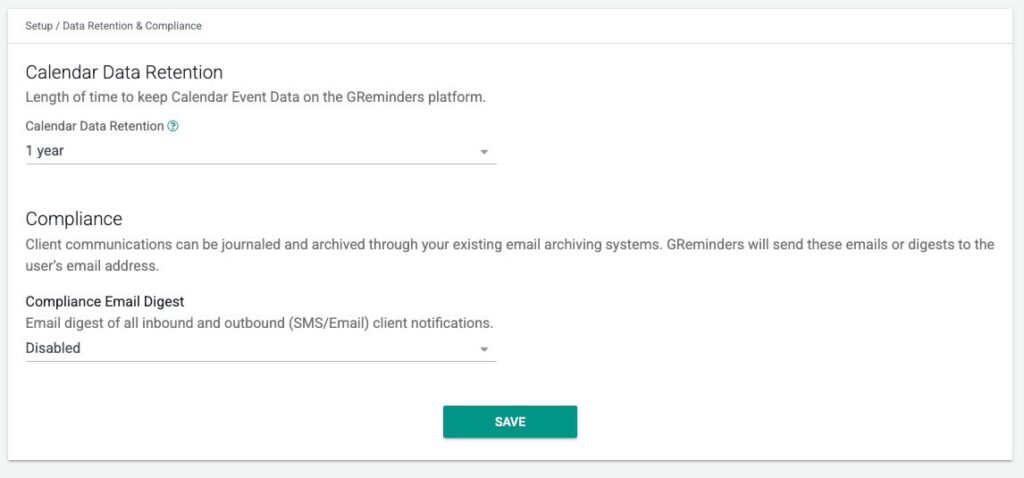
Additionally here you can also enable a Compliance Email Digest that will send you all SMS/Email Messages sent to the client.
AI Notetaker Retention
The platform offers a granular, three-tiered data retention architecture designed to align with your firm’s specific security and compliance posture. You can independently manage the lifecycles of Audio/Video Assets, Transcripts, and AI Action Directives —ranging from a “Session-Only” mode (None) for immediate privacy to “Account Lifetime” for long-term regulatory fulfillment. This hierarchy ensures that while you might purge heavy media files after one month to minimize liability, you can maintain the searchable intelligence of transcripts and AI summaries for the full seven-year FINRA/SEC window. Please note that the AI Notetaker Retention acts as the definitive ceiling; if this global setting is more restrictive than your individual media or transcript timers, it will supersede them to ensure permanent data deletion across your organization.
Audio/Video Retention (Media Assets):
- Controls: Ranges from None to 1 Year.
- Logic: Media is purged once it exceeds the selected duration.
- Privacy Mode: Setting this to None disables all recording capabilities, ensuring no audio or video data is ever persisted to our servers.
Transcript Retention (Text Records):
- Controls: Ranges from None to 7 Years (or Account Lifetime).
- Logic: Manages the searchable text version of the meeting independently from the video.
- Compliance Alignment: Allows for long-term storage of the written record to satisfy regulatory “Books and Records” requirements without the storage overhead of video.
- Please Note that If Transcript is not retained you cannot regenerate a Summary OR use Ask Anything against the Meeting since the source transcript no longer exists.
Overall Notetaker Retention (The Master Policy):
- Controls: Ranges from None to 7 Years (or Account Lifetime).
- Definition: This governs the Entire Notetaker Record, including summaries and task extractions. (Note: AI Action Directives are now managed independently under the AI Action Directives menu).
- Supersede Logic: This setting acts as the global “ceiling.” If the Overall Retention period is shorter than the Video or Transcript periods, this setting takes precedence and will trigger a permanent deletion of all related meeting data.
Strategic Flexibility:
- Posture-Based Configuration: Clients can customize these durations to match their specific security and compliance posture.
- Risk Mitigation: This architecture allows firms to minimize liability by purging raw media quickly while retaining high-value AI insights for the duration of the client relationship.
To access Notetaker Data Retention Settings go to Setup > Notetaker Settings and modify these settings there.
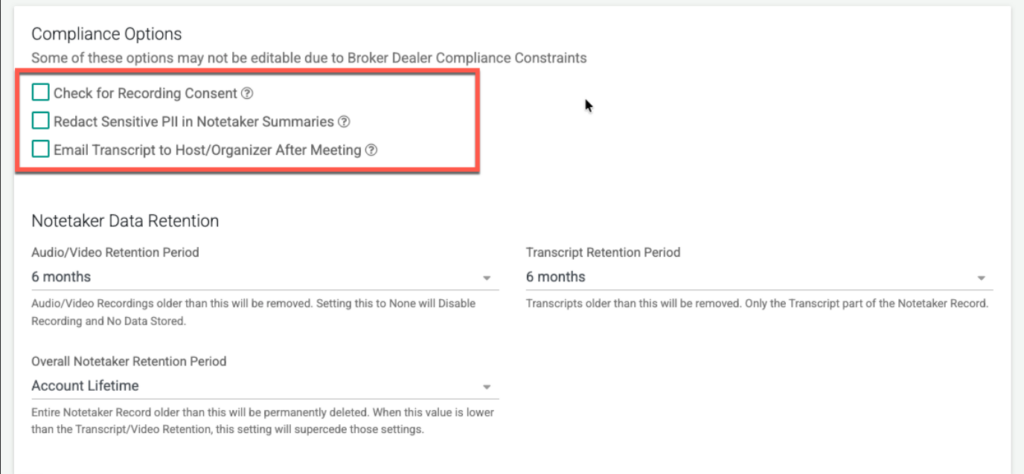
Note: If you are part of a Broker Dealer these setting may be already set for you to comply to their Governance Rules.
Additionally there are Compliance Options including:
Check for Recording Consent: Automatically detects and logs verbal confirmations or platform-specific consent prompts (such as Zoom’s built-in notification) to ensure all participants have agreed to the session being recorded. Any notetakers with a Gavel icon on them will have consented “Recording”.
Redact Sensitive PII in Notetaker Summaries: Enhances security by automatically identifying and masking highly sensitive Personally Identifiable Information—including Social Security, Passport, Driver’s License, and Credit Card numbers, as well as ABA and financial account details—within AI-generated summaries.
Email Transcript to Host/Organizer: Facilitates seamless journaling and archiving by automatically delivering a full text transcript to the meeting host inbox, immediately following the session’s conclusion. Since in most cases the Inbox is already being archived, this serves as a great way to journal and archive transcripts.
Note: If you utilize follow up reminders, need to archive communication with clients or wish to take advantage of reports based on past data, setting a retention period too short may have negative consequences.
If you have any questions, please reach out to us here.
FAQs
How can I control the retention period for my calendar and event data in GReminders?
You can control how long GReminders keeps your calendar and event data by going to Setup and selecting Compliance. There, you can choose the length of time you want GReminders to retain your event and notetaker data on their servers, aligning with your security and compliance posture.
What are the different retention options available for AI Notetaker data?
The AI Notetaker offers a three-tiered data retention system for Audio/Video Assets, Transcripts, and AI Action Directives. Audio/Video retention ranges from None to 1 Year, Transcript retention ranges from None to 7 Years or Account Lifetime, and the Overall Notetaker Retention governs the entire record with similar time ranges. These settings allow firms to customize data retention based on their security and compliance needs.
What compliance features are available to ensure data privacy and consent during recordings?
GReminders provides several compliance options including automatic detection and logging of recording consent (such as verbal confirmations or platform prompts), redaction of sensitive Personally Identifiable Information (PII) in AI-generated summaries, and automatic emailing of full text transcripts to the meeting host for journaling and archiving.