If you want to use GReminders to send SMS Reminders or Email Reminders or follow ups, often times you may want to do this for multiple people within your Organization.
If this is the case you have 2 options:
- Add another User to your GReminders Account OR
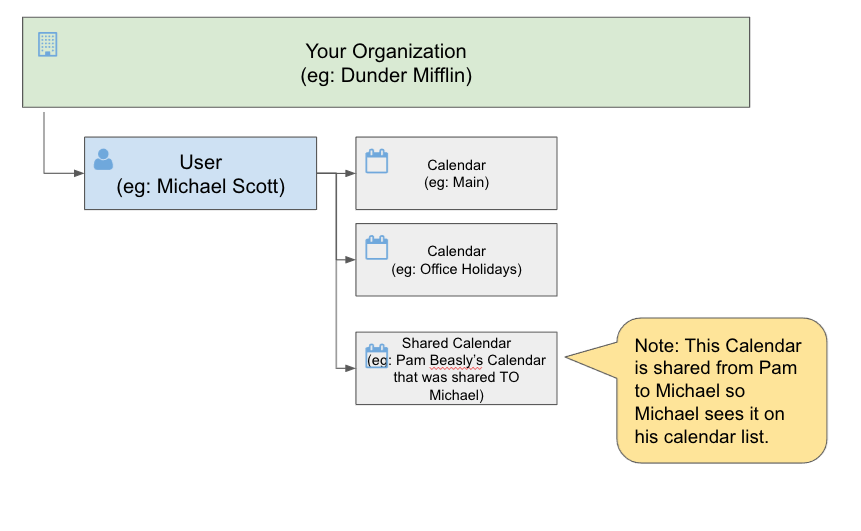
- Have that other user SHARE their Calendar to your User and then you have access to USE that calendar in your GReminders Account.
Here we will examine which way is “better” and/or what the tradeoffs are:
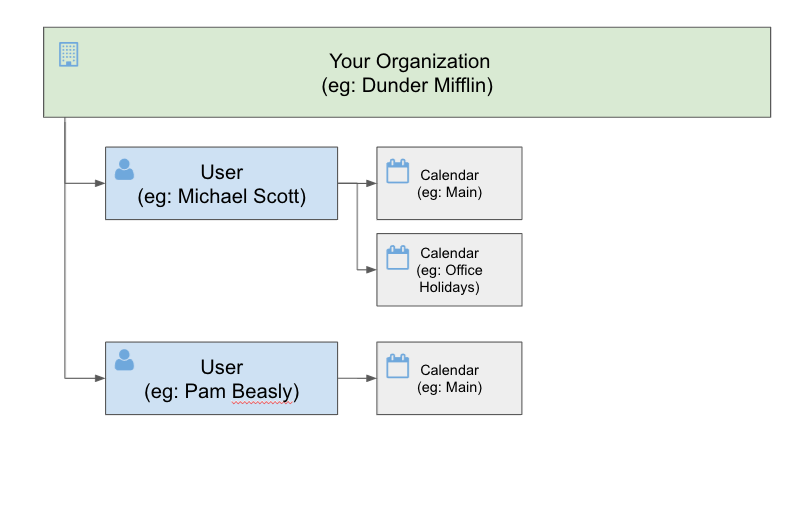
The case for adding another User:
Pros:
- When your customers reply/confirm or reschedule, those notifications go to the relevant user, and not to the “master user”.
- Each user can have their own Event Types for scheduling and have their own booking pages.
- Each user can have their own “Brand”
Cons:
- There is a per user license fee.
- Each user needs to manage which calendars Reminders are sent on.
The structure for separate users:
The case for sharing Calendar to a “Master User”
Pros:
- No extra license fees
Cons:
- Only the “master user” will be notified of any confirmations, cancellations, or reschedules.
- Reminder Templates cannot be as “dynamic” since the Template Variables cannot refer to another User (names, emails, phone numbers, etc…)
- Other users cannot have booking pages.
The structure for shared calendars:
Learn more about how to Share Calendars to a single user.
If you have any questions please contact [email protected].
Happy Scheduling!
keywords: calendar management, shared users, users, user admin, calendar admin, add calendar, share calendar
FAQs
What are the options for managing reminders for multiple people within an organization using GReminders?
You can either add another user to your GReminders account or have that other user share their calendar with your user, allowing you to use that calendar within your GReminders account.
What are the pros and cons of adding another user to your GReminders account?
Pros include notifications going to the relevant user, each user having their own event types and booking pages, and individual branding. Cons include a per-user license fee and the need for each user to manage which calendars reminders are sent on.
What are the advantages and disadvantages of sharing calendars to a master user?
Advantages include no extra license fees. Disadvantages are that only the master user receives notifications, reminder templates cannot dynamically refer to other users, and other users cannot have booking pages.