
Overview
GReminders offers a direct, native integration with Redtail CRM, a leading customer relationship management platform tailored for financial advisors. This integration streamlines scheduling, reminder automation, and data syncing, allowing advisors to save time, reduce no-shows, and enhance client engagement. As a new hire at GReminders, understanding the integration settings is critical to assisting users in setting up and optimizing their workflows. This guide covers the setup process, key features, and best practices for supporting users with Redtail CRM integration.
Why GReminders Integrates with Redtail CRM
GReminders enhances Redtail CRM by:
- Automating appointment scheduling and reminders (SMS, email, or voice).
- Syncing Redtail calendar events and contact data bi-directionally.
- Triggering Redtail workflows and activity templates when events are scheduled.
- Mapping client responses to Redtail User Defined Fields (UDFs) for customized data tracking.
- Providing reporting based on Redtail Activity Types and Meeting Categories.
- Accessing Scheduling, Pre Meeting Briefs and Notetaker INSIDE Redtail
This integration is unique because GReminders is the only scheduling and reminder app with a direct integration to Redtail, eliminating the need for third-party tools like Zapier or Retriever Cloud, unlike competitors such as Calendly.
Setting Up the Redtail CRM Integration
The setup process is straightforward and designed to be seamless for users. Here’s how to guide a user through the integration setup:
Step 1: Access Integration Settings
- In the GReminders app, from the admin environment under Setup (top right-hand corner), navigate to the Integrations section under General on the left menu.
- Scroll to Redtail CRM and click Setup.
- Users must provide their Redtail username and password to authenticate the integration. The user making this connection must be a Redtail admin. If Redtail is the primary calendar, select Redtail during the calendar connection step.
Step 2: Configure Integration Options
Once connected, users can customize how GReminders interacts with Redtail CRM. Key settings include:
- Pull Best Phone Number from Contacts: Imports the contact’s first name, last name, and phone number from Redtail when an activity is scheduled. This ensures reminders are personalized and sent to the correct contact.
- Time Zone Detection: If enabled, GReminders uses the contact’s mailing address zip code in Redtail to determine their time zone, ensuring reminders for remote meetings (e.g., via Zoom or Google Meet) are sent with accurate timing.
- Activity Types Selection: Displays all Redtail Activity Types, which are checked by default. Users can uncheck types (e.g., tasks) that should not block their team’s availability on the GReminders scheduling calendar.
- Sync Redtail Activity Categories with GReminders Meeting Categories: When enabled, this syncs categories nightly, allowing users to map GReminders Meeting Categories to Redtail Activity Categories for consistent reporting and automation triggers.
- Sync Redtail UDFs and Keywords to leverage as Bulk Send Criteria
- Sync Redtail Contact Roles
- Map Custom Questions to UDFs: Answers to custom questions in GReminders booking forms can be mapped to Redtail User Defined Fields (UDFs) for tailored data tracking (e.g., client preferences or review dates).
- Opt-Out Email List: Add the company domain to prevent colleagues invited as attendees from receiving client reminders.
- Security Options: Set data retention periods for event data and configure password reset frequency for compliance.
- Contact Ownership Routing: Route clients to their Servicing or Writing Advisor’s calendar based on email matching in Redtail. A fallback route can be set for unmatched contacts (e.g., new clients directed to a general form).
Step 3: Verify Integration
After setup, confirm the integration status shows as Connected in the GReminders Set Up > Integrations section. If issues arise, ensure the Redtail credentials are correct and check Redtail’s documentation for additional setup steps, as some integrations may require manual enabling.
Key Features of the Integration
Understanding the following features will help you assist users in maximizing the integration’s potential:
- Automated Scheduling and Reminders:
- Events scheduled via GReminders are added to the Redtail calendar with the chosen Activity Type and Activity Category. Additionally, within an event type, you can use Advanced – Location Based meeting types. This allows you to map specific Redtail Activity Types to different meeting locations automatically. This ensures your Redtail calendar reflects the correct meeting format (and color) without manual intervention.
- SMS and email reminders are sent based on user-defined templates, with options to include variables like {{invitee.firstname}} for personalization.
- Reminders are logged as notes in Redtail against the matching contact.
- Clients can confirm appointments, with confirmations visible on the Redtail calendar via a checkmark icon.
- Workflow and Activity Template, Opportunity and Task Creation Automation:
- When an event is scheduled, GReminders can trigger Redtail workflows or activity templates (e.g., for onboarding or client reviews). Users select templates from a dropdown in the Event Types settings under Workflows.
- Best practice: Set Redtail Activity Templates to “all day” to ensure they appear correctly in the calendar’s “all day” section.
- When an event is scheduled, an opportunity can be populated onto the opportunity tracker to ensure no new or existing business opportunities fall through the cracks. AI Notetaker will also recommend opportunities based on conversation details and can be pushed to the CRM post-meeting.
- Tasks can be created and assigned post meeting via the GR AI Notetaker – Tasks will auto populate and category, templates, descriptions, due dates, subject lines and assignees can all be edited.
- IMPORTANT: When leveraging Redtail automations to launch workflows (an activity category triggers a workflow) you must launch the workflow from GReminders automations and create the activity with a DIFFERENT category. Redtail API does not allow us to leverage existing activity trigger automations, the workflow must come from GReminders and cannot leverage the existing category your redtail automation uses to launch. Reach out to support for assistance on configuring this in Redtail and GReminders
- Bi-Directional Syncing:
- Events created manually in Redtail are imported into GReminders, triggering reminders without additional setup.
- New contacts booking through GReminders are added to Redtail, or existing contacts are matched based on email or other criteria.
- Reporting and Data Management:
- GReminders syncs Redtail Activity Categories with Meeting Categories for nightly reporting, enabling users to track meeting types and automate CRM actions.
- Use Redtail Tag Groups, Keywords, and Contact Udf’s to organize contacts (e.g., for annual reviews) and trigger targeted notifications via GReminders.
- Zoom and Other Meeting App Integration:
- For GReminders-scheduled events, Virtual meeting links are added to the location of the event automatically.
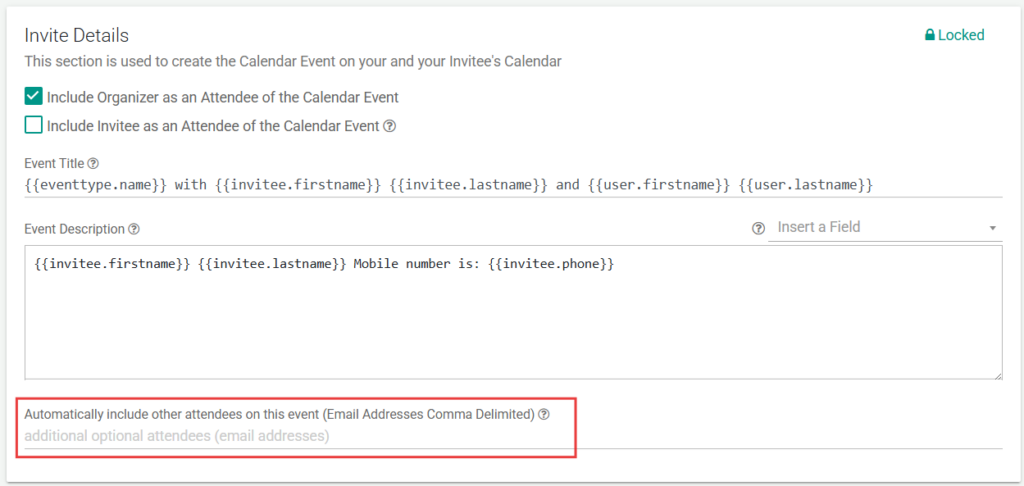
- CC’ing an optional attendee on meetings booked via GReminders:
- Within an Event Type, if the email address being included is tied to a Redtail user as well as a GReminders user account, they will be added as an attendee and not a guest.
Add GReminders Inside the Redtail Interface
You can now get Scheduling, Pre Meeting Briefs and AI Notetaker inside the Redtail Interface. Read this article for displaying these buttons inside Redtail.
FAQs
How do I set up the Redtail CRM integration in GReminders?
To set up the Redtail CRM integration, go to the GReminders app admin environment, navigate to Setup > Integrations, find Redtail CRM, and click Setup. Authenticate using a Redtail admin username and password. Then configure integration options such as phone number syncing, time zone detection, activity types, and contact routing. Finally, verify the integration status shows as Connected.
What key features does the GReminders and Redtail CRM integration offer?
The integration offers automated scheduling and reminders with SMS, email, and voice options, bi-directional syncing of calendar events and contacts, triggering of Redtail workflows and activity templates, mapping of client responses to User Defined Fields (UDFs), reporting based on activity types and meeting categories, and the ability to access scheduling, pre-meeting briefs, and AI Notetaker inside Redtail.
Can GReminders trigger Redtail workflows and automate tasks?
Yes, when an event is scheduled via GReminders, it can trigger Redtail workflows or activity templates selected in the event settings. Additionally, opportunities can be created and tracked, and tasks can be auto-populated and assigned post-meeting using the GR AI Notetaker. Note that workflows must be launched from GReminders with a different activity category due to Redtail API limitations.